
Wordpress July 08, 2022 • 3 min read

How to download &install a Wordpress theme purchased from themeforest

If you are looking for a guide to find the step by step methods to install a Wordpress theme purchased from themeforest this blog post is helpful to you. Download Wordpress theme zip file from themefo...

E
Authored By
Elina Carter
Content Specialist & Tech Author
Fact-Checked By
Sarah Jenkins
Head of Technical Quality & Security Audits
Verified Publisher E-E-A-T
Hibiscus Technolab
How to download &install a Wordpress theme purchased from themeforest

Executive Summary / AI Direct Answer (TL;DR)

Summary: If you are looking for a guide to find the step by step methods to install a Wordpress theme purchased from themeforest this blog post is helpful to you. Download Wordpress theme zip file from themefo...

Key Takeaways:
  • Comprehensive overview of how to download &install a wordpress theme purchased from themeforest
  • Key practical implementations, best practices, and architecture tips
  • Proven strategies for web performance, technical optimization, and scalability

If you are looking for a guide to find the step by step methods to install a Wordpress theme purchased from themeforest this blog post is helpful to you.

Download Wordpress theme zip file from themeforest

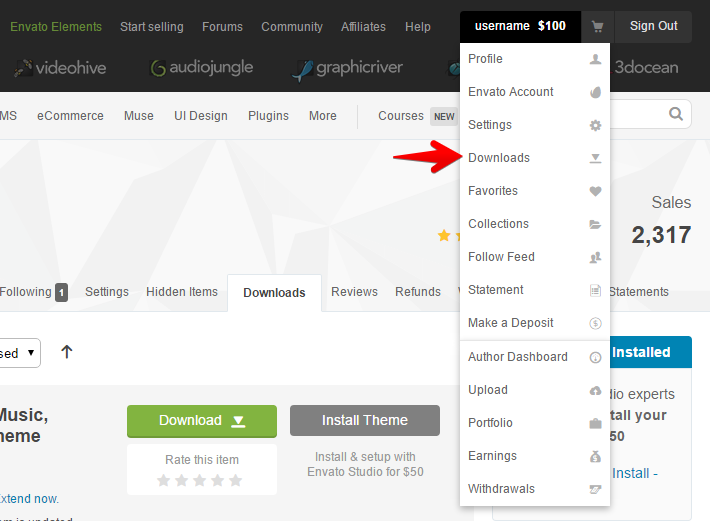
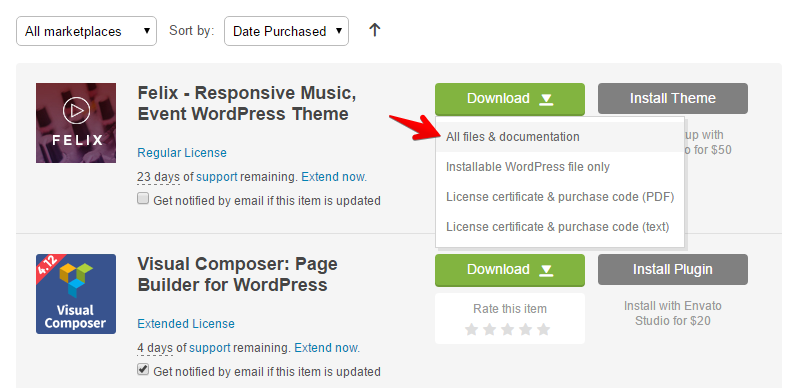
After purchasing your theme, navigate your account area in themeforest, click on your user name and access the sub menu named 'Downloads', Here you can see the name of theme you have purchased. Click on the "Download" button, select "All files & Documentation" and save the zip file in a folder on your local machine. After you download the zip package, unzip it and you can see another zip inside the same folder with the file name almost matching the theme's name (eg: fashion.zip).
Install Wordpress in your hosting panel

Access your hosting panel and Install Wordpress using one-click installer available in your main hosting control panel interface. If one-click installer is not available, then download Wordpress and upload it using FTP, You can use FTP clients like Filezilla for the same purpose. Create a database and followup the further steps to install Wordpress

Setup your Wordpress theme through Wordpress admin area

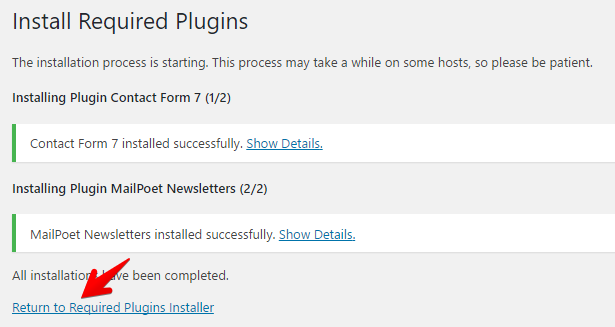
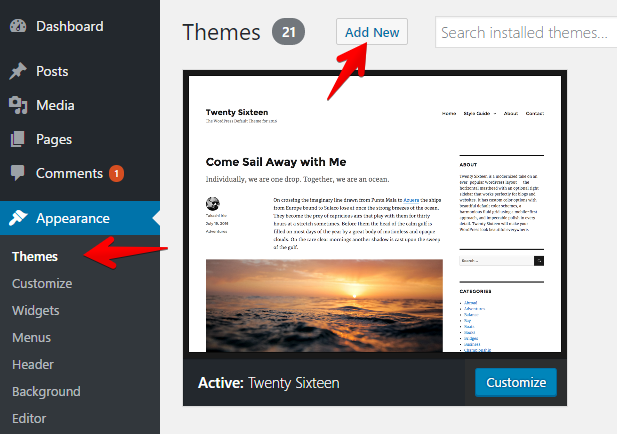
After finishing the Wordpress installation, Access the Wordpress admin area and then navigate to "Appearance > Themes" and upload the zip file that pertains to the theme and install the required plugins. After finishing this step, Refer the theme manual and follow the steps to install the demo using one-click demo setup which is available nowadays with most of the themes
If you need a Wordpress expert from our side to handle all the above task and install the theme successfully within 24 hours turn around time please order the Express Wordpress theme installation service using the button below

E
About The Author • E-E-A-T Verified

Elina Carter

Content Specialist & Tech Author

Senior technical content author and technology researcher at Hibiscus Technolab, specializing in web architecture, WordPress ecosystems, and cloud systems.

Published under editorial oversight of Hibiscus Technolab:

Related Technical Guides

Wordpress

Unleashing the Power of theme.json in WordPress: The Ultimate Guide

With the evolution of WordPress, developers and designers have consistently sought new way...

Read Guide →
Wordpress

The Dynamic Duo: Exploring the Role of React.js in WordPress and Its Future

In the ever-evolving landscape of web development, the integration of powerful front-end l...

Read Guide →
Wordpress

The benefits of using a custom made Wordpress theme for your website rather than going for a readymade theme

Creating a custom-made WordPress theme for your website offers numerous advantages over op...

Read Guide →
Scale Your Technical Foundation

Need Help Implementing These Engineering Practices?

Our senior engineers design high-performance architectures, develop custom WordPress solutions, and execute AI search dominance. Discover our 12 Specialist Services, compare our Monthly Retainers, or check our Proprietary SaaS Tools.

View Retainers Get in Touch

0+

Platforms Engineered

0%

US, UK & Global Base

0%

On-Time SLA Delivery

0+

Years Track Record

Trusted Across The Globe

Don't just take our word for it. Hear what growing businesses around the world have to say about partnering with us.